上一篇文章中我们已经了解到了Flink的窗口的一些概念,在这篇博客中主要介绍一下Flink窗口相关的窗口函数、窗口触发器和驱逐器以及Flink对延迟数据的处理。
窗口函数
在定义好Flink的窗口之后,我们可以定义窗口内数据的计算逻辑(Window Function),在Flink中指定了四种类型的Window Function,分别为 ReduceFunction,AggregateFunction,FoldFunction以及ProcessWindowFunction。按照计算的原理可分为:
增量聚合函数:
- ReduceFunction
- AggregateFunction
- FoldFunction
增量聚合函数计算性能较高,占用存储空间少,这是因为在计算过程中主要是基于中间状态的计算结果,窗口中只维护中间结果的状态值,不需要缓存原始数据。
全量窗口函数
- ProcessWindowFunction
全量窗口函数的使用的代价相对较高,性能比较弱,这是因为算子需要对属于该窗口的数据进行缓存,等到窗口触发时,对原始数据进行汇总计算,当数据接入过多或者窗口时间过长时,有可能导致计算性能下降。
ReduceFunction
熟悉MapReduce的人都知道Reduce实际上是聚合计算,在Flink中ReduceFunction是对于输入的两个类型相同的数据元素按照指定的计算方法进行聚合的操作逻辑。
package com.hph.window.function;

import org.apache.flink.api.common.functions.MapFunction;
import org.apache.flink.api.common.functions.ReduceFunction;
import org.apache.flink.api.java.functions.KeySelector;
import org.apache.flink.api.java.tuple.Tuple2;
import org.apache.flink.configuration.Configuration;
import org.apache.flink.streaming.api.TimeCharacteristic;
import org.apache.flink.streaming.api.datastream.DataStreamSource;
import org.apache.flink.streaming.api.environment.StreamExecutionEnvironment;
import org.apache.flink.streaming.api.functions.source.RichSourceFunction;
import org.apache.flink.streaming.api.watermark.Watermark;
import org.apache.flink.streaming.api.windowing.assigners.SlidingEventTimeWindows;
import org.apache.flink.streaming.api.windowing.time.Time;

import java.text.SimpleDateFormat;
import java.util.Date;
import java.util.Random;

public class MyWindowsReduceFunction {
    public static void main(String[] args) throws Exception {


        StreamExecutionEnvironment environment = StreamExecutionEnvironment.getExecutionEnvironment();

        environment.setStreamTimeCharacteristic(TimeCharacteristic.EventTime);


        DataStreamSource<String> dataStreamSource = environment.addSource(new RichSourceFunction<String>() {
            @Override
            public void open(Configuration parameters) throws Exception {
                super.open(parameters);

            }

            boolean isRunning = true;

            @Override
            public void run(SourceContext<String> ctx) throws Exception {
                //随机产生数据为 A-Z附带时间戳
                while (isRunning) {
                    SimpleDateFormat simpleDateFormat = new SimpleDateFormat("yyyy/MM/dd HH:mm:ss");
                    Thread.sleep(1000);
                    char i = (char) (65 + new Random().nextInt(25));
                    long timeMills = (System.currentTimeMillis());
                    //格式化数据为A_Z的字符 + 时间
                    String element = i + "_" + simpleDateFormat.format(new Date(timeMills));
                    //设置时间戳
                    ctx.collectWithTimestamp(element, timeMills);
                    //水印时间=时间戳+0S
                    ctx.emitWatermark(new Watermark(timeMills + 0));
                }
            }

            @Override
            public void cancel() {
                isRunning = false;
            }
        });
        dataStreamSource.print();

        //将数据转化为 Tuple2 之后对数据进行分组,同是创建一个窗口 每5秒滑动一次
        dataStreamSource.map(new MapFunction<String, Tuple2<String, Integer>>() {
            @Override
            public Tuple2<String, Integer> map(String value) throws Exception {
                String word = value.split("_")[0];
                return Tuple2.of(word, 1);
            }
        }).keyBy(new KeySelector<Tuple2<String, Integer>, String>() {
            @Override
            public String getKey(Tuple2<String, Integer> value) throws Exception {
                return value.f0;
            }
            //这里也可以将reduce换为sum(1)
        }).timeWindow(Time.seconds(5)).reduce(new ReduceFunction<Tuple2<String, Integer>>() {
            //实现reduce功能
            @Override
            public Tuple2<String, Integer> reduce(Tuple2<String, Integer> value1, Tuple2<String, Integer> value2) throws Exception {
                return Tuple2.of(value1.f0, value1.f1 + value2.f1);
            }
        }).print();
        environment.execute("MyWindowsReduceFunction");
    }

} 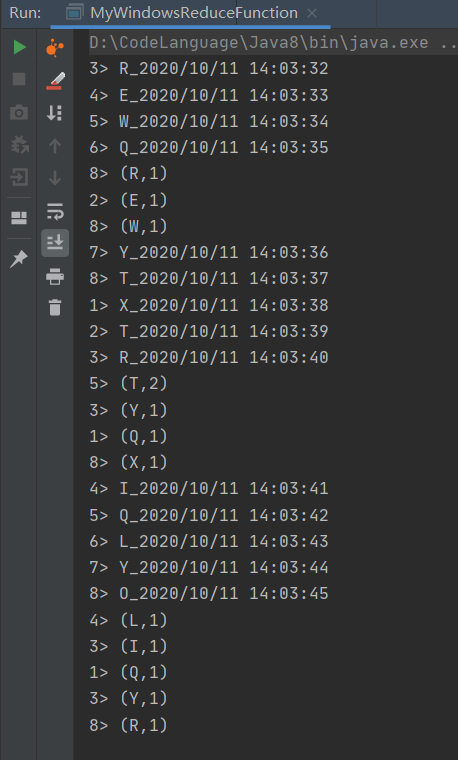
这里我们简单的实现了WordCount,将相同Key的数据进行累加。
AggregateFunction
AggregateFunction也是基于中间状态计算结果的增量计算函数,但是AggregateFunction在窗口计算上更加通用,AggregateFunction接口相对ReduceFunction更加灵活,实现复杂度也相对较高,需要定义Accumulator的计算结果的逻辑,merge方法定义Accumulator的逻辑。下面代码实现了WordCount的简单功能
package com.hph.window.function;

import org.apache.flink.api.common.functions.AggregateFunction;
import org.apache.flink.api.common.functions.MapFunction;
import org.apache.flink.api.java.functions.KeySelector;
import org.apache.flink.api.java.tuple.Tuple2;
import org.apache.flink.configuration.Configuration;
import org.apache.flink.streaming.api.TimeCharacteristic;
import org.apache.flink.streaming.api.datastream.DataStreamSource;
import org.apache.flink.streaming.api.environment.StreamExecutionEnvironment;
import org.apache.flink.streaming.api.functions.source.RichSourceFunction;
import org.apache.flink.streaming.api.watermark.Watermark;
import org.apache.flink.streaming.api.windowing.assigners.SlidingEventTimeWindows;
import org.apache.flink.streaming.api.windowing.time.Time;

import java.text.SimpleDateFormat;
import java.util.Date;
import java.util.Random;

public class MyWindowsAggregateFunction {
    public static void main(String[] args) throws Exception {

        StreamExecutionEnvironment environment = StreamExecutionEnvironment.getExecutionEnvironment();

        environment.setStreamTimeCharacteristic(TimeCharacteristic.EventTime);


        DataStreamSource<String> dataStreamSource = environment.addSource(new RichSourceFunction<String>() {
            @Override
            public void open(Configuration parameters) throws Exception {
                super.open(parameters);

            }

            boolean isRunning = true;

            @Override
            public void run(SourceContext<String> ctx) throws Exception {
                //随机产生数据为 A-Z附带时间戳
                while (isRunning) {
                    SimpleDateFormat simpleDateFormat = new SimpleDateFormat("yyyy/MM/dd HH:mm:ss");
                    Thread.sleep(1000);
                    char i = (char) (65 + new Random().nextInt(25));
                    long timeMills = (System.currentTimeMillis());
                    //格式化数据为A_Z的字符 + 时间
                    String element = i + "_" + simpleDateFormat.format(new Date(timeMills));
                    //设置时间戳
                    ctx.collectWithTimestamp(element, timeMills);
                    //水印时间=时间戳+0S
                    ctx.emitWatermark(new Watermark(timeMills + 0));
                }
            }

            @Override
            public void cancel() {
                isRunning = false;
            }
        });
        dataStreamSource.print();

        //将数据转化为 Tuple2 之后对数据进行分组,
        dataStreamSource.map(new MapFunction<String, Tuple2<String, Integer>>() {
            @Override
            public Tuple2<String, Integer> map(String value) throws Exception {
                String word = value.split("_")[0];
                return Tuple2.of(word, 1);
            }
        }).keyBy(new KeySelector<Tuple2<String, Integer>, String>() {
            @Override
            public String getKey(Tuple2<String, Integer> value) throws Exception {
                return value.f0;
            }
        }).timeWindow(Time.seconds(5)).aggregate(new AggregateFunction<Tuple2<String, Integer>, Tuple2<String, Integer>, Tuple2<String, Integer>>() {


            //初始化一个累加器
            @Override
            public Tuple2<String, Integer> createAccumulator() {
                return Tuple2.of("", 0);
            }

            //累加器的计算逻辑
            @Override
            public Tuple2<String, Integer> add(Tuple2<String, Integer> value, Tuple2<String, Integer> accumulator) {
                return Tuple2.of(value.f0, value.f1 + accumulator.f1);
            }

            //获取累加器的结果
            @Override
            public Tuple2<String, Integer> getResult(Tuple2<String, Integer> accumulator) {
                return accumulator;
            }

            //合并结果
            @Override
            public Tuple2<String, Integer> merge(Tuple2<String, Integer> a, Tuple2<String, Integer> b) {
                return Tuple2.of(a.f0, a.f1 + b.f1);
            }
        }).print();

        environment.execute("MyWindowsAggregateFunction");

    }
} 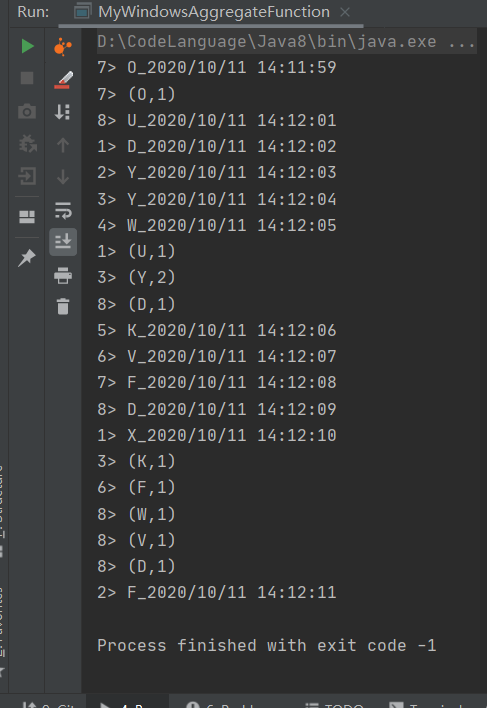
使用AggregateFunction会更加灵活,实现也相对来说比较复杂,主要涉及到累加器的操作和合并结果。
FoldFunction
该函数目前已经过时,该函数的主要功能为合并外部的元素和输窗口中输入的元素。比如我们将每个窗口内的元素都添加上”hphblog->”
package com.hph.window.function;

import org.apache.flink.api.common.functions.FoldFunction;
import org.apache.flink.api.common.functions.MapFunction;
import org.apache.flink.api.java.functions.KeySelector;
import org.apache.flink.api.java.tuple.Tuple2;
import org.apache.flink.configuration.Configuration;
import org.apache.flink.streaming.api.TimeCharacteristic;
import org.apache.flink.streaming.api.datastream.DataStreamSource;
import org.apache.flink.streaming.api.environment.StreamExecutionEnvironment;
import org.apache.flink.streaming.api.functions.source.RichSourceFunction;
import org.apache.flink.streaming.api.watermark.Watermark;
import org.apache.flink.streaming.api.windowing.assigners.SlidingEventTimeWindows;
import org.apache.flink.streaming.api.windowing.time.Time;

import java.text.SimpleDateFormat;
import java.util.Date;
import java.util.Random;

public class MywindowFoldFunction {
    public static void main(String[] args) throws Exception {

        StreamExecutionEnvironment environment = StreamExecutionEnvironment.getExecutionEnvironment();

        environment.setStreamTimeCharacteristic(TimeCharacteristic.EventTime);


        DataStreamSource<String> dataStreamSource = environment.addSource(new RichSourceFunction<String>() {
            @Override
            public void open(Configuration parameters) throws Exception {
                super.open(parameters);

            }

            boolean isRunning = true;

            @Override
            public void run(SourceContext<String> ctx) throws Exception {
                //随机产生数据为 A-Z附带时间戳
                while (isRunning) {
                    SimpleDateFormat simpleDateFormat = new SimpleDateFormat("yyyy/MM/dd HH:mm:ss");
                    Thread.sleep(1000);
                    char i = (char) (65 + new Random().nextInt(25));
                    long timeMills = (System.currentTimeMillis());
                    //格式化数据为A_Z的字符 + 时间
                    String element = i + "_" + simpleDateFormat.format(new Date(timeMills));
                    //设置时间戳
                    ctx.collectWithTimestamp(element, timeMills);
                    //水印时间=时间戳+0S
                    ctx.emitWatermark(new Watermark(timeMills + 0));
                }
            }

            @Override
            public void cancel() {
                isRunning = false;
            }
        });
        dataStreamSource.print();

        //将数据转化为 Tuple2 之后对数据进行分组,同是创建一个窗口 每5秒滑动一次
        dataStreamSource.map(new MapFunction<String, Tuple2<String, Integer>>() {
            @Override
            public Tuple2<String, Integer> map(String value) throws Exception {
                String word = value.split("_")[0];
                return Tuple2.of(word, 1);
            }
        }).keyBy(new KeySelector<Tuple2<String, Integer>, String>() {
            @Override
            public String getKey(Tuple2<String, Integer> value) throws Exception {
                return value.f0;
            }
        }).window(SlidingEventTimeWindows.of(Time.seconds(4), Time.seconds(2))).fold("hphblog->", new FoldFunction<Tuple2<String, Integer>, String>() {
            @Override
            public String fold(String accumulator, Tuple2<String, Integer> value) throws Exception {
                return accumulator + value.f0;
            }
        }).print();
        environment.execute("MywindowFoldFunction");
        // fold() cannot be used with session windows or other mergeable windows.
    }
}
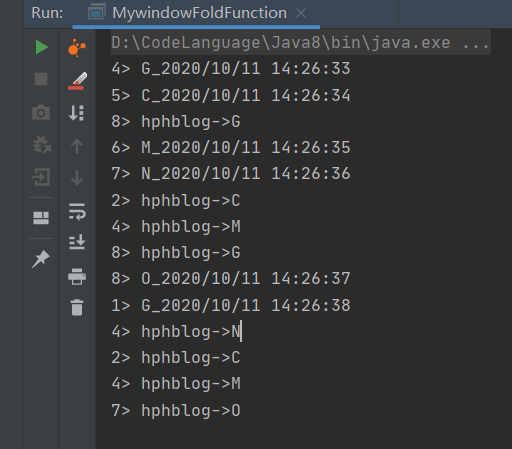
该API已经弃用目前官方推荐使用AggregateFunction该功能。
ProcessWindowFunction
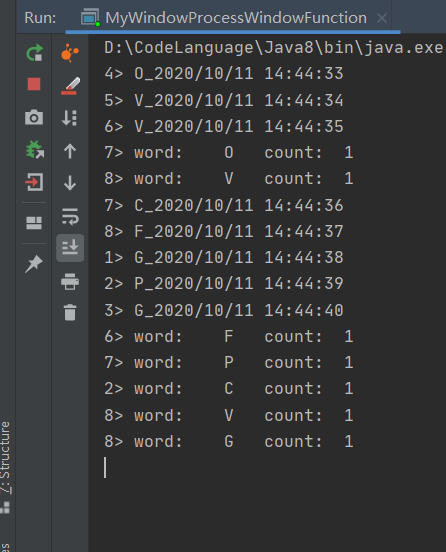
ReduceFunction和AggregateFunction都是基于中间状态实现的增量计算的窗口函数,可以满足绝大部分场景,当然也可以使用ProcessWindowFunction更加灵活的实现所需的功能,ProcessWindowFunction可以更加灵活地支持基于窗口全部数据元素的记过计算。在实现ProcessWindowFunction接口过程中如果不操作状态数据只需要实现process()即可,下面是基于ProcessWindowFunction实现的wordcount。
package com.hph.window.function;

import org.apache.flink.api.common.functions.MapFunction;
import org.apache.flink.api.java.functions.KeySelector;
import org.apache.flink.api.java.tuple.Tuple2;
import org.apache.flink.configuration.Configuration;
import org.apache.flink.streaming.api.TimeCharacteristic;
import org.apache.flink.streaming.api.datastream.DataStreamSource;
import org.apache.flink.streaming.api.environment.StreamExecutionEnvironment;
import org.apache.flink.streaming.api.functions.source.RichSourceFunction;
import org.apache.flink.streaming.api.functions.windowing.ProcessWindowFunction;
import org.apache.flink.streaming.api.watermark.Watermark;
import org.apache.flink.streaming.api.windowing.assigners.SlidingEventTimeWindows;
import org.apache.flink.streaming.api.windowing.time.Time;
import org.apache.flink.streaming.api.windowing.windows.TimeWindow;
import org.apache.flink.util.Collector;

import java.text.SimpleDateFormat;
import java.util.Date;
import java.util.Random;

public class MyWindowProcessWindowFunction {
    public static void main(String[] args) throws Exception {


        StreamExecutionEnvironment environment = StreamExecutionEnvironment.getExecutionEnvironment();

        environment.setStreamTimeCharacteristic(TimeCharacteristic.EventTime);


        DataStreamSource<String> dataStreamSource = environment.addSource(new RichSourceFunction<String>() {
            @Override
            public void open(Configuration parameters) throws Exception {
                super.open(parameters);

            }

            boolean isRunning = true;

            @Override
            public void run(SourceContext<String> ctx) throws Exception {
                //随机产生数据为 A-Z附带时间戳
                while (isRunning) {
                    SimpleDateFormat simpleDateFormat = new SimpleDateFormat("yyyy/MM/dd HH:mm:ss");
                    Thread.sleep(1000);
                    char i = (char) (65 + new Random().nextInt(25));
                    long timeMills = (System.currentTimeMillis());
                    //格式化数据为A_Z的字符 + 时间
                    String element = i + "_" + simpleDateFormat.format(new Date(timeMills));
                    //设置时间戳
                    ctx.collectWithTimestamp(element, timeMills);
                    //水印时间=时间戳+0S
                    ctx.emitWatermark(new Watermark(timeMills + 0));
                }
            }

            @Override
            public void cancel() {
                isRunning = false;
            }
        });
        dataStreamSource.print();

        //将数据转化为 Tuple2 之后对数据进行分组,同是创建一个窗口 每5秒滑动一次
        dataStreamSource.map(new MapFunction<String, Tuple2<String, Integer>>() {
            @Override
            public Tuple2<String, Integer> map(String value) throws Exception {
                String word = value.split("_")[0];
                return Tuple2.of(word, 1);
            }
        }).keyBy(new KeySelector<Tuple2<String, Integer>, String>() {
            @Override
            public String getKey(Tuple2<String, Integer> value) throws Exception {
                return value.f0;
            }
        }).timeWindow(Time.seconds(5)).process(new ProcessWindowFunction<Tuple2<String, Integer>, String, String, TimeWindow>() {
            @Override
            public void process(String s, Context context, Iterable<Tuple2<String, Integer>> elements, Collector<String> out) throws Exception {
                int cnt = 0;
                for (Tuple2<String, Integer> element : elements) {
                    cnt++;
                    out.collect("word:\t" + element.f0 + "\tcount:\t" + cnt);
                }
            }
        }).print();

        environment.execute("MyWindowProcessWindowFunction");
    }
}
ProcessWindowFunctionWithAggregation
实际上在开发的过程中使用ProcessWindowFuntion进行简单的聚合运算是比较浪费性能的,这就需要用户明确自身的业务计算场景,选择合适的WindowFunction来统计窗口结果,ReduceFunction和AggregateFunction等增量聚合函数虽然一定程度上能够提升窗口计算性能,但是灵活性不足,我们可以使用ProcessWindowFunction结合Incremental AggregateFunction Function和ProcessWindowFuntion进行整合,借鉴两种函数的优势。
package com.hph.window.function;

import org.apache.flink.api.common.functions.MapFunction;
import org.apache.flink.api.common.functions.ReduceFunction;
import org.apache.flink.api.java.functions.KeySelector;
import org.apache.flink.api.java.tuple.Tuple2;
import org.apache.flink.configuration.Configuration;
import org.apache.flink.streaming.api.TimeCharacteristic;
import org.apache.flink.streaming.api.datastream.DataStreamSource;
import org.apache.flink.streaming.api.environment.StreamExecutionEnvironment;
import org.apache.flink.streaming.api.functions.source.RichSourceFunction;
import org.apache.flink.streaming.api.functions.windowing.ProcessWindowFunction;
import org.apache.flink.streaming.api.watermark.Watermark;
import org.apache.flink.streaming.api.windowing.time.Time;
import org.apache.flink.streaming.api.windowing.windows.TimeWindow;
import org.apache.flink.util.Collector;

import java.text.SimpleDateFormat;
import java.util.Date;
import java.util.Random;

public class MyProcessWindowFunctionWithAggregation {
    public static void main(String[] args) throws Exception {

        StreamExecutionEnvironment environment = StreamExecutionEnvironment.getExecutionEnvironment();

        environment.setStreamTimeCharacteristic(TimeCharacteristic.EventTime);


        DataStreamSource<String> dataStreamSource = environment.addSource(new RichSourceFunction<String>() {
            @Override
            public void open(Configuration parameters) throws Exception {
                super.open(parameters);

            }

            boolean isRunning = true;

            @Override
            public void run(SourceContext<String> ctx) throws Exception {
                //随机产生数据为 A-Z附带时间戳
                while (isRunning) {
                    SimpleDateFormat simpleDateFormat = new SimpleDateFormat("yyyy/MM/dd HH:mm:ss");
                    Thread.sleep(1000);
                    char i = (char) (65 + new Random().nextInt(25));
                    long timeMills = (System.currentTimeMillis());
                    //格式化数据为A_Z的字符 + 时间
                    String element = i + "_" + simpleDateFormat.format(new Date(timeMills));
                    //设置时间戳
                    ctx.collectWithTimestamp(element, timeMills);
                    //水印时间=时间戳+0S
                    ctx.emitWatermark(new Watermark(timeMills + 0));
                }
            }

            @Override
            public void cancel() {
                isRunning = false;
            }
        });
        dataStreamSource.print();

        //将数据转化为 Tuple2 之后对数据进行分组,同是创建一个窗口 每5秒滑动一次
        dataStreamSource.map(new MapFunction<String, Tuple2<String, Integer>>() {
            @Override
            public Tuple2<String, Integer> map(String value) throws Exception {
                String word = value.split("_")[0];
                return Tuple2.of(word, 1);
            }
        }).keyBy(new KeySelector<Tuple2<String, Integer>, String>() {
            @Override
            public String getKey(Tuple2<String, Integer> value) throws Exception {
                return value.f0;
            }
            //使用窗口函数和ReduceFunction
        }).timeWindow(Time.seconds(5)).reduce(new MyReduceFunction(), new MyProcessWindowFunction()).print();
        environment.execute("MyProcessWindowFunctionWithAggregation");
    }


    //继承ReduceFunction
    private static class MyReduceFunction implements ReduceFunction<Tuple2<String, Integer>> {

        @Override
        public Tuple2<String, Integer> reduce(Tuple2<String, Integer> value1, Tuple2<String, Integer> value2) throws Exception {
            return Tuple2.of(value1.f0, value1.f1 + value2.f1);
        }
    }

    //编写自己的窗口函数
    private static class MyProcessWindowFunction extends ProcessWindowFunction<Tuple2<String, Integer>, Tuple2<String, Integer>, String, TimeWindow> {
        @Override
        public void process(String s, Context context, Iterable<Tuple2<String, Integer>> elements, Collector<Tuple2<String, Integer>> out) throws Exception {
            int cnt = 0;
            for (Tuple2<String, Integer> element : elements) {
                cnt++;
                out.collect(Tuple2.of(element.f0, cnt));
            }
        }
    }
}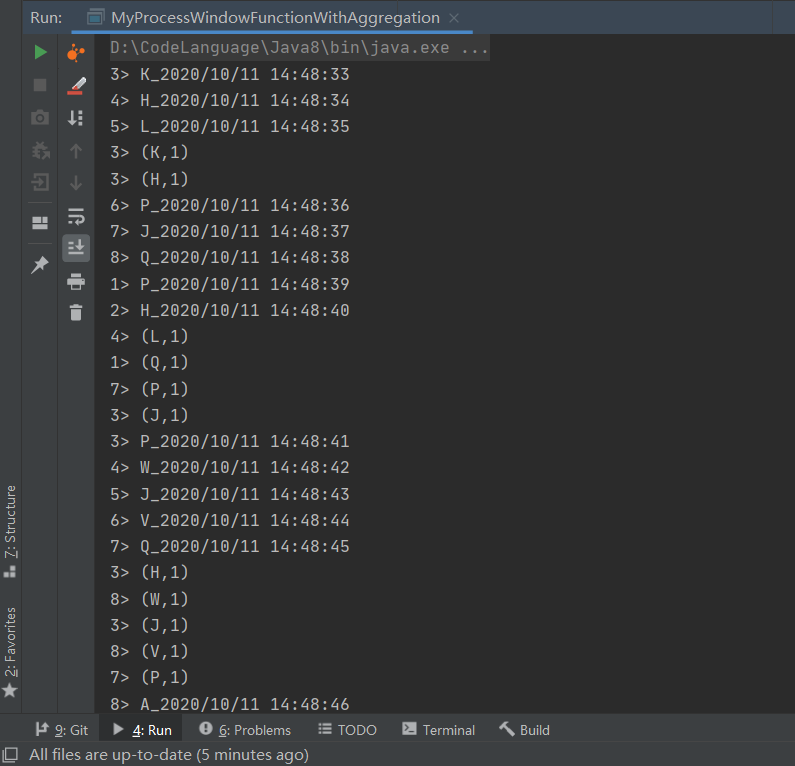
在开发过程中reduce处需要传入两个Function,分为了ReduceFunction和ProcessWindowFunction。
窗口触发器
数据进入窗口后,窗口是否触发WindowFunction取决于是否满足出发条件,每中类型窗口对应不同的触发条件,保证接入窗口的数据按照规定触发逻辑进行统计计算,Flink内部的触发器分别为:
- EventTimeTrigger:通过对比Watermark和窗口EndTime确定是否触发窗口,如果Watermark的时间大于Windows EndTime则触发计算,否则窗口继续等待;
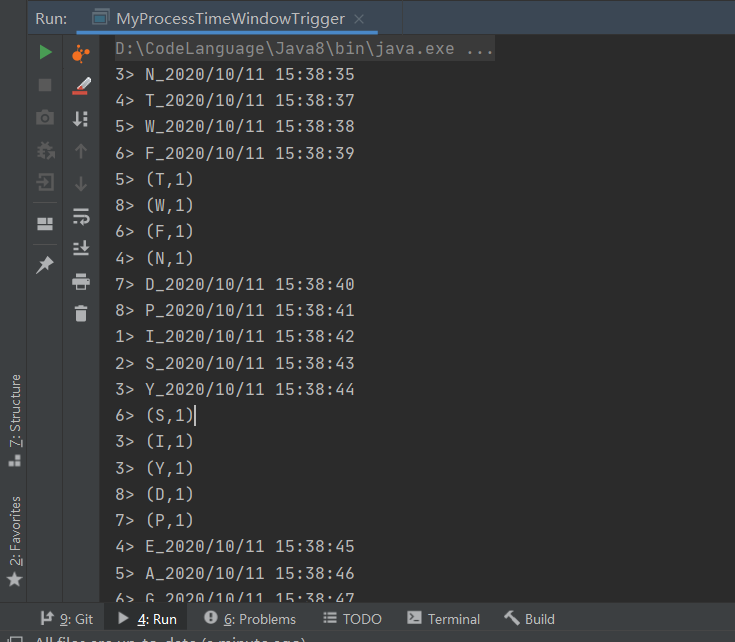
- ProcessTimeTrigger:通过对比ProcessTime和窗口EndTime确定是否触发窗口,如果窗口Process Time大于Windows EndTime则触发计算,否则窗口继续等待;
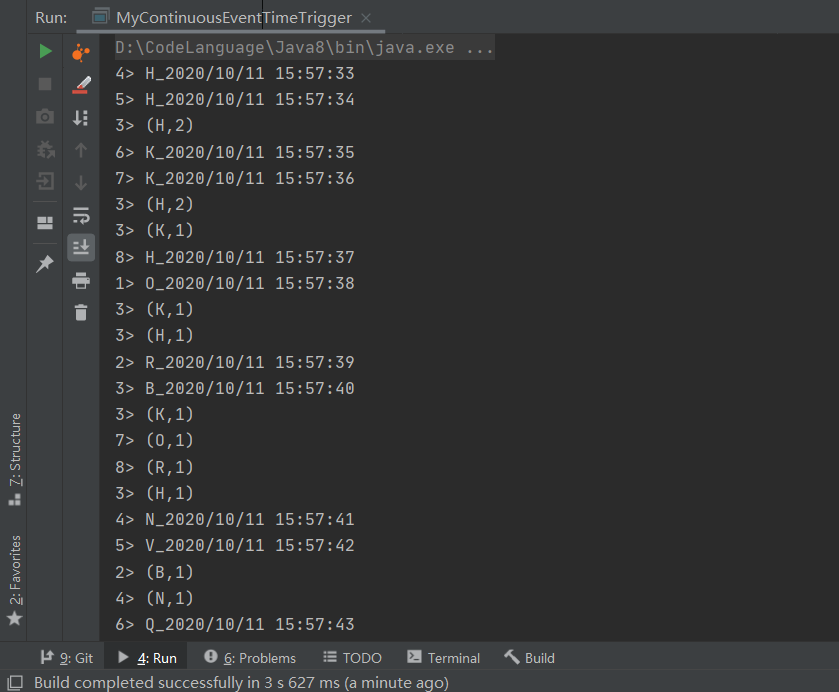
- ContinuousEventTimeTrigger:根据间隔时间周期性触发窗口或者Window的结束时间小于当前EventTime触发窗口计算
- ContinuousProcessingTimeTrigger:根据间隔时间周期性触发窗口或者Window的结束时间小于当前ProcessTime触发窗口计算;
- CountTrigger:根据接入数据量是否超过设定的阈值确定是否触发窗口计算;❑DeltaTrigger:根据接入数据计算出来的Delta指标是否超过指定的Threshold,判断是否触发窗口计算;
- PurgingTrigger:可以将任意触发器作为参数转换为Purge类型触发器,计算完成后数据将被清理。
EventTimeWindowTrigger
package com.hph.window.trigger;

import org.apache.flink.api.common.functions.MapFunction;
import org.apache.flink.api.java.functions.KeySelector;
import org.apache.flink.api.java.tuple.Tuple2;
import org.apache.flink.configuration.Configuration;
import org.apache.flink.streaming.api.TimeCharacteristic;
import org.apache.flink.streaming.api.datastream.DataStreamSource;
import org.apache.flink.streaming.api.environment.StreamExecutionEnvironment;
import org.apache.flink.streaming.api.functions.source.RichSourceFunction;
import org.apache.flink.streaming.api.watermark.Watermark;
import org.apache.flink.streaming.api.windowing.time.Time;
import org.apache.flink.streaming.api.windowing.triggers.ContinuousEventTimeTrigger;
import org.apache.flink.streaming.api.windowing.triggers.ProcessingTimeTrigger;

import java.text.SimpleDateFormat;
import java.util.Date;
import java.util.Random;

public class MyContinuousEventTimeTrigger {
    public static void main(String[] args) throws Exception {
        StreamExecutionEnvironment environment = StreamExecutionEnvironment.getExecutionEnvironment();
        environment.setStreamTimeCharacteristic(TimeCharacteristic.EventTime);


        DataStreamSource<String> dataStreamSource = environment.addSource(new RichSourceFunction<String>() {
            @Override
            public void open(Configuration parameters) throws Exception {
                super.open(parameters);

            }

            boolean isRunning = true;

            @Override
            public void run(SourceContext<String> ctx) throws Exception {
                //随机产生数据为 A-Z附带时间戳
                while (isRunning) {
                    SimpleDateFormat simpleDateFormat = new SimpleDateFormat("yyyy/MM/dd HH:mm:ss");
                    Thread.sleep(1000);
                    char i = (char) (65 + new Random().nextInt(25));
                    long timeMills = (System.currentTimeMillis());
                    //格式化数据为A_Z的字符 + 时间
                    String element = i + "_" + simpleDateFormat.format(new Date(timeMills));
                    //设置时间戳
                    ctx.collectWithTimestamp(element, timeMills);
                    //水印时间=时间戳+0S
                    ctx.emitWatermark(new Watermark(timeMills + 0));
                }
            }

            @Override
            public void cancel() {
                isRunning = false;
            }
        });
        dataStreamSource.print();


        //将数据转化为 Tuple2 之后对数据进行分组,同是创建一个窗口 每5秒滑动一次
        dataStreamSource.map(new MapFunction<String, Tuple2<String, Integer>>() {
            @Override
            public Tuple2<String, Integer> map(String value) throws Exception {
                String word = value.split("_")[0];
                return Tuple2.of(word, 1);
            }
        }).keyBy(new KeySelector<Tuple2<String, Integer>, String>() {
            @Override
            public String getKey(Tuple2<String, Integer> value) throws Exception {
                return value.f0;
            }
        }).timeWindow(Time.seconds(4)).trigger(ContinuousEventTimeTrigger.of(Time.seconds(2))).sum(1).print();

        environment.execute("MyContinuousEventTimeTrigger");
    }
}
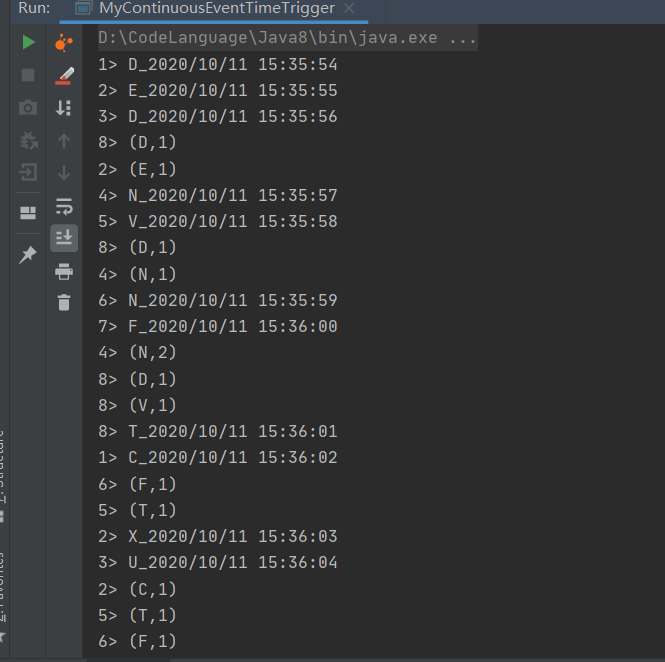
这里我们定义的是每个2s触发一次计算。由于窗口是左闭右开,上限不达一次在第一次计算时为D和E元素进行计算
ProcessTimeWindowTrigger
package com.hph.window.trigger;

import org.apache.flink.api.common.functions.MapFunction;
import org.apache.flink.api.java.functions.KeySelector;
import org.apache.flink.api.java.tuple.Tuple2;
import org.apache.flink.configuration.Configuration;
import org.apache.flink.streaming.api.TimeCharacteristic;
import org.apache.flink.streaming.api.datastream.DataStreamSource;
import org.apache.flink.streaming.api.environment.StreamExecutionEnvironment;
import org.apache.flink.streaming.api.functions.source.RichSourceFunction;
import org.apache.flink.streaming.api.watermark.Watermark;
import org.apache.flink.streaming.api.windowing.time.Time;
import org.apache.flink.streaming.api.windowing.triggers.EventTimeTrigger;
import org.apache.flink.streaming.api.windowing.triggers.ProcessingTimeTrigger;

import java.text.SimpleDateFormat;
import java.util.Date;
import java.util.Random;

public class MyProcessTimeWindowTrigger {
    public static void main(String[] args) throws Exception {
        StreamExecutionEnvironment environment = StreamExecutionEnvironment.getExecutionEnvironment();
        environment.setStreamTimeCharacteristic(TimeCharacteristic.ProcessingTime);


        DataStreamSource<String> dataStreamSource = environment.addSource(new RichSourceFunction<String>() {
            @Override
            public void open(Configuration parameters) throws Exception {
                super.open(parameters);

            }

            boolean isRunning = true;

            @Override
            public void run(SourceContext<String> ctx) throws Exception {
                //随机产生数据为 A-Z附带时间戳
                while (isRunning) {
                    SimpleDateFormat simpleDateFormat = new SimpleDateFormat("yyyy/MM/dd HH:mm:ss");
                    Thread.sleep(1000);
                    char i = (char) (65 + new Random().nextInt(25));
                    long timeMills = (System.currentTimeMillis());
                    //格式化数据为A_Z的字符 + 时间
                    String element = i + "_" + simpleDateFormat.format(new Date(timeMills));
                    //设置时间戳
                    ctx.collectWithTimestamp(element, timeMills);
                    //水印时间=时间戳+0S
                    ctx.emitWatermark(new Watermark(timeMills + 0));
                }
            }

            @Override
            public void cancel() {
                isRunning = false;
            }
        });
        dataStreamSource.print();


        //将数据转化为 Tuple2 之后对数据进行分组,同是创建一个窗口 每5秒滑动一次
        dataStreamSource.map(new MapFunction<String, Tuple2<String, Integer>>() {
            @Override
            public Tuple2<String, Integer> map(String value) throws Exception {
                String word = value.split("_")[0];
                return Tuple2.of(word, 1);
            }
        }).keyBy(new KeySelector<Tuple2<String, Integer>, String>() {
            @Override
            public String getKey(Tuple2<String, Integer> value) throws Exception {
                return value.f0;
            }
        }).timeWindow(Time.seconds(5)).trigger(ProcessingTimeTrigger.create()).sum(1).print();

        environment.execute("MyProcessTimeWindowTrigger");
    }
}
ContinuousEventTimeTrigger
package com.hph.window.trigger;

import org.apache.flink.api.common.functions.MapFunction;
import org.apache.flink.api.java.functions.KeySelector;
import org.apache.flink.api.java.tuple.Tuple2;
import org.apache.flink.configuration.Configuration;
import org.apache.flink.streaming.api.TimeCharacteristic;
import org.apache.flink.streaming.api.datastream.DataStreamSource;
import org.apache.flink.streaming.api.environment.StreamExecutionEnvironment;
import org.apache.flink.streaming.api.functions.source.RichSourceFunction;
import org.apache.flink.streaming.api.watermark.Watermark;
import org.apache.flink.streaming.api.windowing.time.Time;
import org.apache.flink.streaming.api.windowing.triggers.ContinuousEventTimeTrigger;

import java.text.SimpleDateFormat;
import java.util.Date;
import java.util.Random;

public class MyContinuousEventTimeTrigger {
    public static void main(String[] args) throws Exception {
        StreamExecutionEnvironment environment = StreamExecutionEnvironment.getExecutionEnvironment();
        environment.setStreamTimeCharacteristic(TimeCharacteristic.EventTime);


        DataStreamSource<String> dataStreamSource = environment.addSource(new RichSourceFunction<String>() {
            @Override
            public void open(Configuration parameters) throws Exception {
                super.open(parameters);

            }

            boolean isRunning = true;

            @Override
            public void run(SourceContext<String> ctx) throws Exception {
                //随机产生数据为 A-Z附带时间戳
                while (isRunning) {
                    SimpleDateFormat simpleDateFormat = new SimpleDateFormat("yyyy/MM/dd HH:mm:ss");
                    Thread.sleep(1000);
                    char i = (char) (65 + new Random().nextInt(25));
                    long timeMills = (System.currentTimeMillis());
                    //格式化数据为A_Z的字符 + 时间
                    String element = i + "_" + simpleDateFormat.format(new Date(timeMills));
                    //设置时间戳
                    ctx.collectWithTimestamp(element, timeMills);
                    //水印时间=时间戳+0S
                    ctx.emitWatermark(new Watermark(timeMills + 0));
                }
            }

            @Override
            public void cancel() {
                isRunning = false;
            }
        });
        dataStreamSource.print();


        //将数据转化为 Tuple2 之后对数据进行分组,同是创建一个窗口 每5秒滑动一次
        dataStreamSource.map(new MapFunction<String, Tuple2<String, Integer>>() {
            @Override
            public Tuple2<String, Integer> map(String value) throws Exception {
                String word = value.split("_")[0];
                return Tuple2.of(word, 1);
            }
        }).keyBy(new KeySelector<Tuple2<String, Integer>, String>() {
            @Override
            public String getKey(Tuple2<String, Integer> value) throws Exception {
                return value.f0;
            }
        }).timeWindow(Time.seconds(4)).trigger(ContinuousEventTimeTrigger.of(Time.seconds(2))).sum(1).print();

        environment.execute("MyContinuousEventTimeTrigger");
    }
}
PurgingTrigger
package com.hph.window.trigger;

import org.apache.flink.api.common.functions.MapFunction;
import org.apache.flink.api.java.functions.KeySelector;
import org.apache.flink.api.java.tuple.Tuple2;
import org.apache.flink.configuration.Configuration;
import org.apache.flink.streaming.api.TimeCharacteristic;
import org.apache.flink.streaming.api.datastream.DataStreamSource;
import org.apache.flink.streaming.api.environment.StreamExecutionEnvironment;
import org.apache.flink.streaming.api.functions.source.RichSourceFunction;
import org.apache.flink.streaming.api.watermark.Watermark;
import org.apache.flink.streaming.api.windowing.time.Time;
import org.apache.flink.streaming.api.windowing.triggers.PurgingTrigger;
import org.apache.flink.streaming.api.windowing.triggers.Trigger;
import org.apache.flink.streaming.api.windowing.triggers.TriggerResult;
import org.apache.flink.streaming.api.windowing.windows.TimeWindow;

import java.text.SimpleDateFormat;
import java.util.Date;
import java.util.Random;

public class MyPurgingTrigger {
    public static void main(String[] args) throws Exception {
        StreamExecutionEnvironment environment = StreamExecutionEnvironment.getExecutionEnvironment();
        environment.setStreamTimeCharacteristic(TimeCharacteristic.EventTime);


        DataStreamSource<String> dataStreamSource = environment.addSource(new RichSourceFunction<String>() {
            @Override
            public void open(Configuration parameters) throws Exception {
                super.open(parameters);

            }

            boolean isRunning = true;

            @Override
            public void run(SourceContext<String> ctx) throws Exception {
                //随机产生数据为 A-Z附带时间戳
                while (isRunning) {
                    SimpleDateFormat simpleDateFormat = new SimpleDateFormat("yyyy/MM/dd HH:mm:ss");
                    Thread.sleep(1000);
                    char i = (char) (65 + new Random().nextInt(25));
                    long timeMills = (System.currentTimeMillis());
                    //格式化数据为A_Z的字符 + 时间
                    String element = i + "_" + simpleDateFormat.format(new Date(timeMills));
                    //设置时间戳
                    ctx.collectWithTimestamp(element, timeMills);
                    //水印时间=时间戳+0S
                    ctx.emitWatermark(new Watermark(timeMills + 0));
                }
            }

            @Override
            public void cancel() {
                isRunning = false;
            }
        });
        dataStreamSource.print();


        //将数据转化为 Tuple2 之后对数据进行分组,同是创建一个窗口 每5秒滑动一次
        dataStreamSource.map(new MapFunction<String, Tuple2<String, Integer>>() {
            @Override
            public Tuple2<String, Integer> map(String value) throws Exception {
                String word = value.split("_")[0];
                return Tuple2.of(word, 1);
            }
        }).keyBy(new KeySelector<Tuple2<String, Integer>, String>() {
            @Override
            public String getKey(Tuple2<String, Integer> value) throws Exception {
                return value.f0;
            }
        }).timeWindow(Time.seconds(5)).trigger(PurgingTrigger.of(new Trigger<Tuple2<String, Integer>, TimeWindow>() {

            @Override
            public TriggerResult onElement(Tuple2<String, Integer> element, long timestamp, TimeWindow window, TriggerContext ctx) throws Exception {
                return TriggerResult.CONTINUE;
            }

            @Override
            public TriggerResult onProcessingTime(long time, TimeWindow window, TriggerContext ctx) throws Exception {
                return TriggerResult.CONTINUE;
            }

            //这里实现的基于EventTime的
            @Override
            public TriggerResult onEventTime(long time, TimeWindow window, TriggerContext ctx) throws Exception {
                return TriggerResult.FIRE;
            }

            @Override
            public void clear(TimeWindow window, TriggerContext ctx) throws Exception {
                ctx.deleteEventTimeTimer(window.maxTimestamp());
            }
        })).sum(1).print();

        environment.execute("MyProcessTimeWindowTrigger");
    }
}
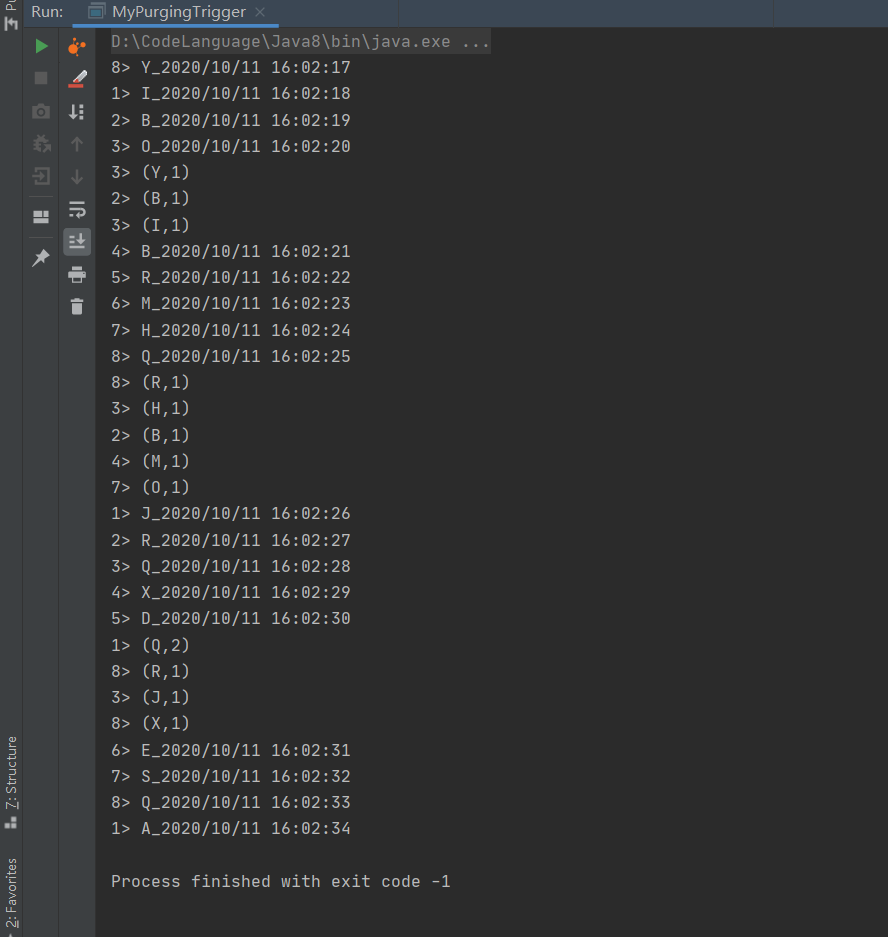
自定义实现Trigger
package com.hph.window.trigger;

import org.apache.flink.api.common.functions.MapFunction;
import org.apache.flink.api.java.functions.KeySelector;
import org.apache.flink.api.java.tuple.Tuple2;
import org.apache.flink.configuration.Configuration;
import org.apache.flink.streaming.api.TimeCharacteristic;
import org.apache.flink.streaming.api.datastream.DataStreamSource;
import org.apache.flink.streaming.api.environment.StreamExecutionEnvironment;
import org.apache.flink.streaming.api.functions.source.RichSourceFunction;
import org.apache.flink.streaming.api.watermark.Watermark;
import org.apache.flink.streaming.api.windowing.time.Time;
import org.apache.flink.streaming.api.windowing.triggers.Trigger;
import org.apache.flink.streaming.api.windowing.triggers.TriggerResult;
import org.apache.flink.streaming.api.windowing.windows.TimeWindow;

import java.text.SimpleDateFormat;
import java.util.Date;
import java.util.Random;


public class MyTrigger {

    public static void main(String[] args) throws Exception {
        StreamExecutionEnvironment environment = StreamExecutionEnvironment.getExecutionEnvironment();
        environment.setStreamTimeCharacteristic(TimeCharacteristic.EventTime);


        DataStreamSource<String> dataStreamSource = environment.addSource(new RichSourceFunction<String>() {
            @Override
            public void open(Configuration parameters) throws Exception {
                super.open(parameters);
            }

            boolean isRunning = true;

            @Override
            public void run(SourceContext<String> ctx) throws Exception {
                //随机产生数据为 A-Z附带时间戳
                while (isRunning) {
                    SimpleDateFormat simpleDateFormat = new SimpleDateFormat("yyyy/MM/dd HH:mm:ss");
                    Thread.sleep(1000);
                    char i = (char) (65 + new Random().nextInt(25));
                    long timeMills = (System.currentTimeMillis());
                    //格式化数据为A_Z的字符 + 时间
                    String element = i + "_" + simpleDateFormat.format(new Date(timeMills));
                    //设置时间戳
                    ctx.collectWithTimestamp(element, timeMills);
                    //水印时间=时间戳+0S
                    ctx.emitWatermark(new Watermark(timeMills + 0));
                }
            }

            @Override
            public void cancel() {
                isRunning = false;
            }
        });
        dataStreamSource.print();


        //将数据转化为 Tuple2 之后对数据进行分组,同是创建一个窗口 每5秒滑动一次
        dataStreamSource.map(new MapFunction<String, org.apache.flink.api.java.tuple.Tuple2<String, Integer>>() {
            @Override
            public org.apache.flink.api.java.tuple.Tuple2<String, Integer> map(String value) throws Exception {
                String word = value.split("_")[0];
                return org.apache.flink.api.java.tuple.Tuple2.of(word, 1);
            }
        }).keyBy(new KeySelector<org.apache.flink.api.java.tuple.Tuple2<String, Integer>, String>() {
            @Override
            public String getKey(Tuple2<String, Integer> value) throws Exception {
                return value.f0;
            }
        }).timeWindow(Time.seconds(3)).trigger(new CustomProcessingTimeTrigger()).sum(1).print();

        environment.execute("MyTrigger");
    }


    private static class CustomProcessingTimeTrigger extends Trigger<Tuple2<String, Integer>, TimeWindow> {
        int flag = 0;

        private CustomProcessingTimeTrigger() {
        }

        @Override
        public TriggerResult onElement(Tuple2<String, Integer> element, long timestamp, TimeWindow window, TriggerContext ctx) throws Exception {
            if (flag > 2) {
                flag = 0;
                return TriggerResult.FIRE;
            } else {
                flag++;
            }
            return TriggerResult.CONTINUE;
        }

        @Override
        public TriggerResult onProcessingTime(long time, TimeWindow window, TriggerContext ctx) throws Exception {
            return TriggerResult.CONTINUE;
        }

        @Override
        public TriggerResult onEventTime(long time, TimeWindow window, TriggerContext ctx) throws Exception {
            return TriggerResult.CONTINUE;
        }

        @Override
        public void clear(TimeWindow window, TriggerContext ctx) throws Exception {
            ctx.deleteEventTimeTimer(window.maxTimestamp());
        }

        @Override
        public boolean canMerge() {
            return true;
        }

        @Override
        public void onMerge(TimeWindow window,
                            OnMergeContext ctx) {
            long windowMaxTimestamp = window.maxTimestamp();
            if (windowMaxTimestamp > ctx.getCurrentProcessingTime()) {
                ctx.registerProcessingTimeTimer(windowMaxTimestamp);
            }
        }
    }
}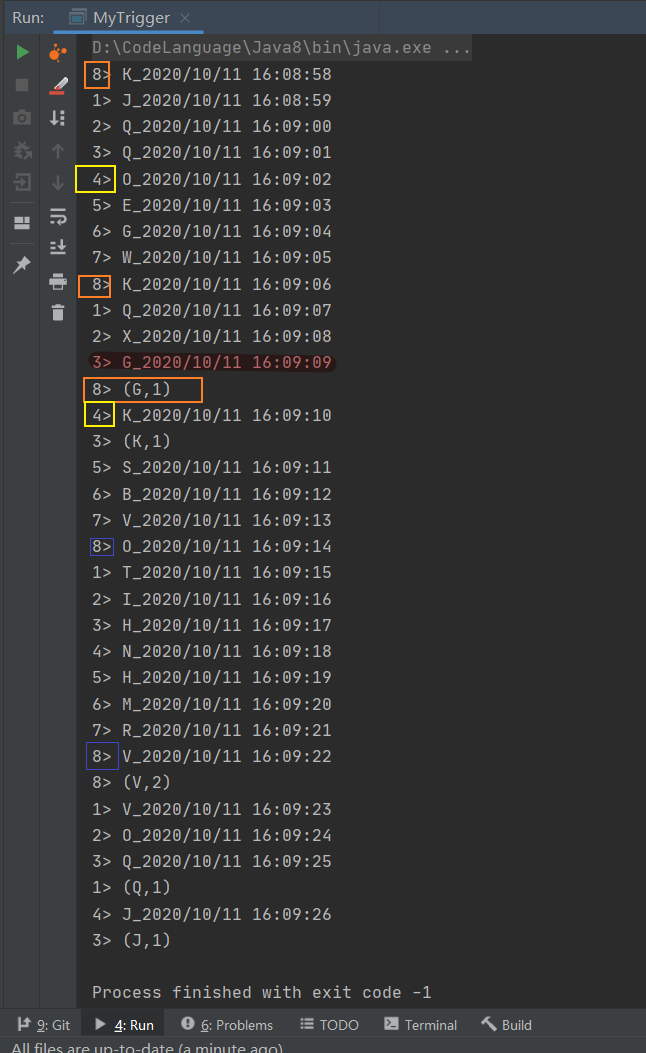
这里我们定义的是基于窗口内元素数量触发计算当窗口内的元素大于2时就触发计算,从图中我们可以看到当窗口内的数据攒够2个时便触发了计算。也可以根据自己业务的具体逻辑对触发器进行适当的修改。
数据剔除器
Evictors(数据剔除器)是Flink窗口机制中一个可选的组件,主要的作用是对进入WindowFunction前后的数据进行剔除处理,Flink内部实现了:
- CountEvictor:保持在窗口中具有固定数量的记录,将超过指定大小的数据在窗口计算前剔除;
- DeltaEvictor:通过定义DeltaFunction和指定threshold,并计算Windows中的元素与最新元素之间的Delta大小,如果超过threshold则将当前数据元素剔除
- TimeEvictor:通过指定时间间隔,将当前窗口中最新元素的时间减去Interval,然后将小于该结果的数据全部剔除,其本质是将具有最新时间的数据选择出来,删除过时的数据。
CountEvictor
package com.hph.window.evictors;

import org.apache.flink.api.common.functions.MapFunction;
import org.apache.flink.api.java.functions.KeySelector;
import org.apache.flink.api.java.tuple.Tuple2;
import org.apache.flink.configuration.Configuration;
import org.apache.flink.streaming.api.TimeCharacteristic;
import org.apache.flink.streaming.api.datastream.DataStreamSource;
import org.apache.flink.streaming.api.environment.StreamExecutionEnvironment;
import org.apache.flink.streaming.api.functions.source.RichSourceFunction;
import org.apache.flink.streaming.api.functions.windowing.ProcessWindowFunction;
import org.apache.flink.streaming.api.watermark.Watermark;
import org.apache.flink.streaming.api.windowing.assigners.GlobalWindows;
import org.apache.flink.streaming.api.windowing.evictors.CountEvictor;
import org.apache.flink.streaming.api.windowing.time.Time;
import org.apache.flink.streaming.api.windowing.triggers.ContinuousProcessingTimeTrigger;
import org.apache.flink.streaming.api.windowing.windows.GlobalWindow;
import org.apache.flink.streaming.api.windowing.windows.TimeWindow;
import org.apache.flink.util.Collector;

import java.text.SimpleDateFormat;
import java.util.Date;
import java.util.Random;

public class MyCountEvictors {
    public static void main(String[] args) throws Exception {
        StreamExecutionEnvironment environment = StreamExecutionEnvironment.getExecutionEnvironment();
        environment.setStreamTimeCharacteristic(TimeCharacteristic.ProcessingTime);

        DataStreamSource<String> dataStreamSource = environment.addSource(new RichSourceFunction<String>() {
            @Override
            public void open(Configuration parameters) throws Exception {
                super.open(parameters);
            }

            boolean isRunning = true;

            @Override
            public void run(SourceContext<String> ctx) throws Exception {
                //随机产生数据为 A-Z附带时间戳
                while (isRunning) {
                    SimpleDateFormat simpleDateFormat = new SimpleDateFormat("yyyy/MM/dd HH:mm:ss ");
                    Thread.sleep(1000);
                    char i = (char) (65 + new Random().nextInt(25));
                    long timeMills = (System.currentTimeMillis());
                    //格式化数据为A_Z的字符 + 时间
                    String element = i + "_" + simpleDateFormat.format(new Date(timeMills));
                    //设置时间戳
                    ctx.collectWithTimestamp(element, timeMills);
                    //水印时间=时间戳+0S
                    ctx.emitWatermark(new Watermark(timeMills + 0));
                }
            }

            @Override
            public void cancel() {
                isRunning = false;
            }
        });
        dataStreamSource.print("使用驱逐器之前->");


        //将数据转化为 Tuple2 之后对数据进行分组,同是创建一个窗口 每5秒滑动一次
        dataStreamSource.map(new MapFunction<String, Tuple2<String, Integer>>() {
            @Override
            public Tuple2<String, Integer> map(String value) throws Exception {
                String word = value.split("_")[0];
                return Tuple2.of(word, 1);
            }
        }).keyBy(new KeySelector<Tuple2<String, Integer>, String>() {
            @Override
            public String getKey(Tuple2<String, Integer> value) throws Exception {
                return value.f0;
            }
        }).timeWindow(Time.seconds(4)).trigger(ContinuousProcessingTimeTrigger.of(Time.seconds(2))).evictor(CountEvictor.of(1)).process(new ProcessWindowFunction<Tuple2<String, Integer>, Object, String, TimeWindow>() {
            @Override
            public void process(String s, Context context, Iterable<Tuple2<String, Integer>> elements, Collector<Object> out) throws Exception {
                for (Tuple2<String, Integer> element : elements) {
                    out.collect(element);
                }
            }
        }).print("使用驱逐器之后->");
        environment.execute("MyCountEvictors");
    }
}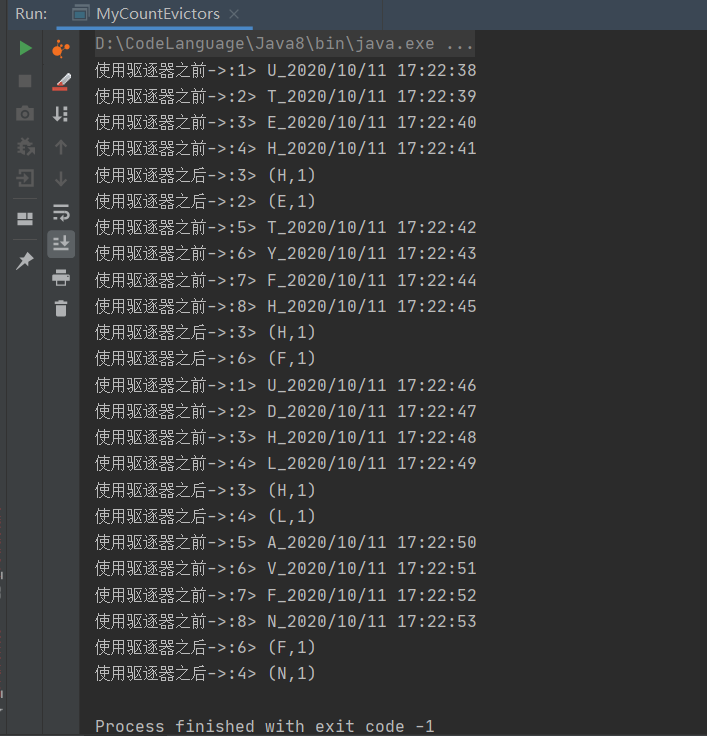
通过使用CountEvictor我们可以发现这里面的窗口为4s触发器为2s一次触发,当满足触发条件是对数据进行剔除,仅留下固定数量的记录,在此之前的数据在窗口计算之前被剔除掉了。
TimeEvictor
package com.hph.window.evictors;

import org.apache.flink.api.common.functions.MapFunction;
import org.apache.flink.api.java.functions.KeySelector;
import org.apache.flink.api.java.tuple.Tuple2;
import org.apache.flink.configuration.Configuration;
import org.apache.flink.streaming.api.TimeCharacteristic;
import org.apache.flink.streaming.api.datastream.DataStreamSource;
import org.apache.flink.streaming.api.environment.StreamExecutionEnvironment;
import org.apache.flink.streaming.api.functions.source.RichSourceFunction;
import org.apache.flink.streaming.api.functions.windowing.ProcessWindowFunction;
import org.apache.flink.streaming.api.watermark.Watermark;
import org.apache.flink.streaming.api.windowing.evictors.CountEvictor;
import org.apache.flink.streaming.api.windowing.evictors.TimeEvictor;
import org.apache.flink.streaming.api.windowing.time.Time;
import org.apache.flink.streaming.api.windowing.triggers.ContinuousProcessingTimeTrigger;
import org.apache.flink.streaming.api.windowing.windows.TimeWindow;
import org.apache.flink.util.Collector;

import java.text.SimpleDateFormat;
import java.util.Date;
import java.util.Random;

public class MyDeltaEvictor {
    public static void main(String[] args) throws Exception {
        StreamExecutionEnvironment environment = StreamExecutionEnvironment.getExecutionEnvironment();
        environment.setStreamTimeCharacteristic(TimeCharacteristic.EventTime);

        DataStreamSource<String> dataStreamSource = environment.addSource(new RichSourceFunction<String>() {
            @Override
            public void open(Configuration parameters) throws Exception {
                super.open(parameters);
            }

            boolean isRunning = true;

            @Override
            public void run(SourceContext<String> ctx) throws Exception {
                //随机产生数据为 A-Z附带时间戳
                while (isRunning) {
                    SimpleDateFormat simpleDateFormat = new SimpleDateFormat("yyyy/MM/dd HH:mm:ss ");
                    Thread.sleep(1000);
                    char i = (char) (65 + new Random().nextInt(25));
                    long timeMills = (System.currentTimeMillis());
                    //格式化数据为A_Z的字符 + 时间
                    String element = i + "_" + simpleDateFormat.format(new Date(timeMills));
                    //设置时间戳
                    ctx.collectWithTimestamp(element, timeMills);
                    //水印时间=时间戳+0S
                    ctx.emitWatermark(new Watermark(timeMills + 0));
                }
            }

            @Override
            public void cancel() {
                isRunning = false;
            }
        });
        dataStreamSource.print("使用驱逐器之前->");


        //将数据转化为 Tuple2 之后对数据进行分组,同是创建一个窗口 每5秒滑动一次
        dataStreamSource.map(new MapFunction<String, Tuple2<String, Integer>>() {
            @Override
            public Tuple2<String, Integer> map(String value) throws Exception {
                String word = value.split("_")[0];
                return Tuple2.of(word, 1);
            }
        }).keyBy(new KeySelector<Tuple2<String, Integer>, String>() {
            @Override
            public String getKey(Tuple2<String, Integer> value) throws Exception {
                return value.f0;
            }
        }).timeWindow(Time.seconds(4)).evictor(TimeEvictor.of(Time.seconds(1))).process(new ProcessWindowFunction<Tuple2<String, Integer>, Object, String, TimeWindow>() {
            @Override
            public void process(String s, Context context, Iterable<Tuple2<String, Integer>> elements, Collector<Object> out) throws Exception {
                for (Tuple2<String, Integer> element : elements) {
                    out.collect(element);
                }
            }
        }).print("使用驱逐器之后->");
        environment.execute("MyEvictors");
    }
}
延迟数据处理
在Flink计算中基于Eventime的窗口处理流式数据,虽然有Watermark的机制,但是只能在一定程度上解决数据乱序的问题,如果数据的延迟比较严重,WaterMark也无法保证等到全部的数据进入窗口再进行处理,Flink默认会把这部分延迟的数据丢掉,但是有些情况下我们还是希望数据延迟到达的情况下能够正常输出处理,这时候就需要使用到Allowed Lateness,在Flink中我们可以指定延迟的最大时间,这个时候窗口计算就会将Window的Endtime加上该指定的最大延迟时间,这个时候后窗口的结束时间(P)=窗口的正常时间+最大延迟时间,当结束的数据中Even Time没有超过这个时间,当Watermark超过了该Window的EndTime就会触发计算,如果事件时间超过了最大的延迟时间(P)就会对数据进行丢弃处理。
package com.hph.window.lateness;

import org.apache.flink.api.common.functions.MapFunction;
import org.apache.flink.api.java.functions.KeySelector;
import org.apache.flink.api.java.tuple.Tuple2;
import org.apache.flink.configuration.Configuration;
import org.apache.flink.streaming.api.TimeCharacteristic;
import org.apache.flink.streaming.api.datastream.DataStreamSource;
import org.apache.flink.streaming.api.datastream.SingleOutputStreamOperator;
import org.apache.flink.streaming.api.environment.StreamExecutionEnvironment;
import org.apache.flink.streaming.api.functions.source.RichSourceFunction;
import org.apache.flink.streaming.api.functions.windowing.ProcessWindowFunction;
import org.apache.flink.streaming.api.watermark.Watermark;
import org.apache.flink.streaming.api.windowing.time.Time;
import org.apache.flink.streaming.api.windowing.windows.TimeWindow;
import org.apache.flink.util.Collector;
import org.apache.flink.util.OutputTag;

import java.text.SimpleDateFormat;
import java.util.Date;
import java.util.Random;

public class MyLateness {
    public static void main(String[] args) throws Exception {
        StreamExecutionEnvironment environment = StreamExecutionEnvironment.getExecutionEnvironment();
        environment.setStreamTimeCharacteristic(TimeCharacteristic.EventTime);

        DataStreamSource<String> dataStreamSource = environment.addSource(new RichSourceFunction<String>() {
            @Override
            public void open(Configuration parameters) throws Exception {
                super.open(parameters);
            }

            boolean isRunning = true;

            @Override
            public void run(SourceContext<String> ctx) throws Exception {
                int cnt = 0;
                //随机产生数据为 A-Z附带时间戳
                while (isRunning) {
                    SimpleDateFormat simpleDateFormat = new SimpleDateFormat("yyyy/MM/dd HH:mm:ss ");
                    if (cnt <= 5) {
                        Thread.sleep(1000);
                        cnt++;
                        char i = (char) (65 + new Random().nextInt(25));
                        //模拟延迟数
                        long timeMills = (System.currentTimeMillis() - cnt * 2000);

                        //格式化数据为A_Z的字符 + 时间
                        String element = i + "_" + simpleDateFormat.format(new Date(timeMills));
                        //设置时间戳
                        ctx.collectWithTimestamp(element, timeMills);
                        //水印时间=时间戳+0S
                        ctx.emitWatermark(new Watermark(timeMills + 0));
                    } else {
                        cnt = 0;
                    }
                }
            }

            @Override
            public void cancel() {
                isRunning = false;
            }
        });
        dataStreamSource.print("写入的数据=>");


        //标记延迟的数据
        final OutputTag<Tuple2<String, Integer>> lateOutputTag = new OutputTag<Tuple2<String, Integer>>("late-data") {
        };


        //将数据转化为 Tuple2 之后对数据进行分组,同是创建一个窗口 每5秒滑动一次
        SingleOutputStreamOperator<Object> result = dataStreamSource.map(new MapFunction<String, Tuple2<String, Integer>>() {
            @Override
            public Tuple2<String, Integer> map(String value) throws Exception {
                String word = value.split("_")[0];
                return Tuple2.of(word, 1);
            }
        }).keyBy(new KeySelector<Tuple2<String, Integer>, String>() {
            @Override
            public String getKey(Tuple2<String, Integer> value) throws Exception {
                return value.f0;
            }
        }).timeWindow(Time.seconds(10)).allowedLateness(Time.seconds(1)).sideOutputLateData(lateOutputTag).process(new ProcessWindowFunction<Tuple2<String, Integer>, Object, String, TimeWindow>() {
            @Override
            public void process(String s, Context context, Iterable<Tuple2<String, Integer>> elements, Collector<Object> out) throws Exception {
                for (Tuple2<String, Integer> element : elements) {
                    out.collect(element);
                }
            }
        });

        result.print("正常处理的数据=>");
        result.getSideOutput(lateOutputTag).print("延迟处理的数据=>");
        environment.execute("MyLateness");

    }
}
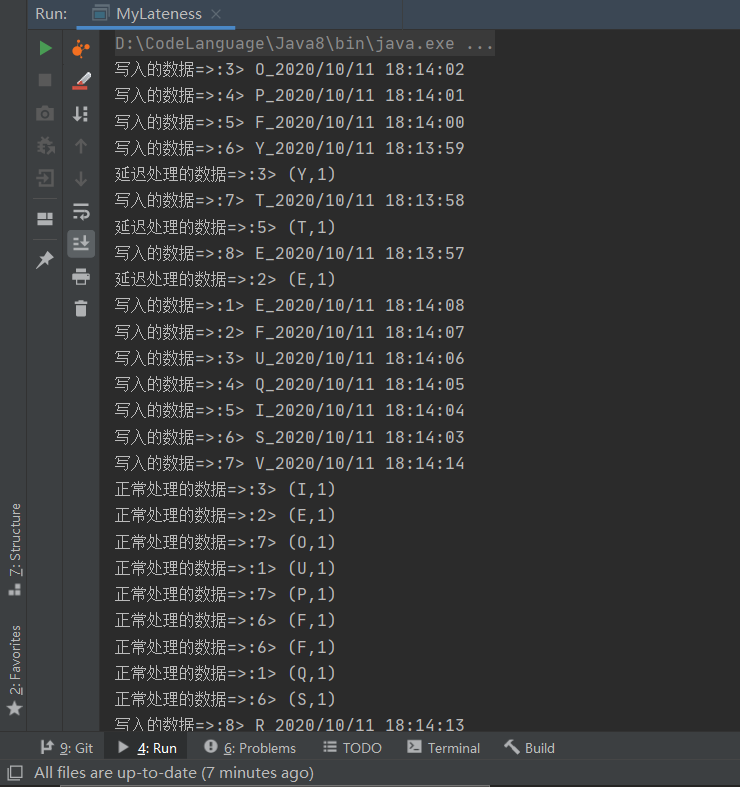
这里我们分析一下首先这里我们划分的事件窗口为10s,在这批数据里面事正常数据应该为0-10s之间的数据,然而在这个过程中这里面的数据出现了延迟的数据不属于当前这个窗口且没有超过最大的事件时间因此延迟数据也可以被Flink正确处理。
Window多流合并
这里我们先简单实现2个数据源,方便测试使用。
package com.hph.window.join;

import org.apache.flink.api.java.tuple.Tuple3;
import org.apache.flink.streaming.api.functions.source.RichParallelSourceFunction;

public class StreamDataSourceA  extends RichParallelSourceFunction<Tuple3<String,String,Long>> {


    private  volatile  boolean running = true;
    @Override
    public void run(SourceContext<Tuple3<String, String, Long>> ctx) throws Exception {
        //事先准备好的数据
        Tuple3[] elements = new Tuple3[]{
          Tuple3.of("a","1",10000005000L),  //[50000 - 60000]
          Tuple3.of("a","1",10000005400L),  //[50000 - 60000]
          Tuple3.of("a","1",10000007990L),  //[70000 - 80000]
          Tuple3.of("a","1",10000011500L),  //[10000 - 12000]
          Tuple3.of("a","1",10000010000L),  //[10000 - 110000]
          Tuple3.of("a","1",10000010800L)

        };
        int count = 0;

        while (running && count< elements.length){
            //数据发送出去
            ctx.collect(new Tuple3<>((String) elements[count].f0, (String) elements[count].f1,(Long) elements[count].f2));
            count++;
            Thread.sleep(1000);
        }


    }

    @Override
    public void cancel() {

    }
}
package com.hph.window.join;
import org.apache.flink.api.java.tuple.Tuple3;
import org.apache.flink.streaming.api.functions.source.RichParallelSourceFunction;
public class StreamDataSourceB extends RichParallelSourceFunction<Tuple3<String, String, Long>> {
private volatile boolean running = true;
@Override
public void run(SourceContext<Tuple3<String, String, Long>> ctx) throws Exception {
//事先准备好的数据
Tuple3[] elements = new Tuple3[]{
Tuple3.of("a", "杭州", 10000005000L),
Tuple3.of("b", "北京", 10000011500L),
};
int count = 0;
while (running && count < elements.length) {
//数据发送出去
ctx.collect(new Tuple3<>((String) elements[count].f0, (String) elements[count].f1, (Long) elements[count].f2));
count++;
Thread.sleep(1000);
}
}
@Override
public void cancel() {
}
}LeftJoin
package com.hph.window.join;

import org.apache.flink.api.common.eventtime.*;
import org.apache.flink.api.common.functions.CoGroupFunction;
import org.apache.flink.api.java.functions.KeySelector;
import org.apache.flink.api.java.tuple.Tuple3;
import org.apache.flink.api.java.tuple.Tuple5;
import org.apache.flink.streaming.api.TimeCharacteristic;
import org.apache.flink.streaming.api.datastream.DataStreamSource;
import org.apache.flink.streaming.api.datastream.SingleOutputStreamOperator;
import org.apache.flink.streaming.api.environment.StreamExecutionEnvironment;
import org.apache.flink.streaming.api.windowing.assigners.TumblingEventTimeWindows;
import org.apache.flink.streaming.api.windowing.time.Time;
import org.apache.flink.util.Collector;


public class FlinkTumblingWindosLeftJoinDemo {
    public static void main(String[] args) throws Exception {
        StreamExecutionEnvironment env = StreamExecutionEnvironment.getExecutionEnvironment();
        //设置EventTime作为时间标准
        env.setStreamTimeCharacteristic(TimeCharacteristic.EventTime);
        //通过Env设置并行度为1,即以后所有的DataStream的并行度都是1
        env.setParallelism(1);

        //设置数据源
        //第一个流
        DataStreamSource<Tuple3<String, String, Long>> leftSource = env.addSource(new StreamDataSourceA());
        DataStreamSource<Tuple3<String, String, Long>> rightSource = env.addSource(new StreamDataSourceB());

        //提取时间
        SingleOutputStreamOperator<Tuple3<String, String, Long>> leftStream = leftSource.assignTimestampsAndWatermarks(
                new WatermarkStrategy<Tuple3<String, String, Long>>() {
                    @Override
                    public WatermarkGenerator<Tuple3<String, String, Long>> createWatermarkGenerator(WatermarkGeneratorSupplier.Context context) {
                        return new WatermarkGenerator<Tuple3<String, String, Long>>() {
                            @Override
                            public void onEvent(Tuple3<String, String, Long> event, long eventTimestamp, WatermarkOutput output) {
                                output.emitWatermark(new Watermark(event.f2 - 1000));

                            }

                            @Override
                            public void onPeriodicEmit(WatermarkOutput output) {

                            }
                        };

                    }

                    @Override
                    public TimestampAssigner<Tuple3<String, String, Long>> createTimestampAssigner(TimestampAssignerSupplier.Context context) {
                        return new TimestampAssigner<Tuple3<String, String, Long>>() {
                            @Override
                            public long extractTimestamp(Tuple3<String, String, Long> element, long recordTimestamp) {
                                return element.f2;
                            }
                        };
                    }
                }
        );

        SingleOutputStreamOperator<Tuple3<String, String, Long>> rightStream = rightSource.assignTimestampsAndWatermarks(
                new WatermarkStrategy<Tuple3<String, String, Long>>() {
                    @Override
                    public WatermarkGenerator<Tuple3<String, String, Long>> createWatermarkGenerator(WatermarkGeneratorSupplier.Context context) {
                        return new WatermarkGenerator<Tuple3<String, String, Long>>() {
                            @Override
                            public void onEvent(Tuple3<String, String, Long> event, long eventTimestamp, WatermarkOutput output) {
                                output.emitWatermark(new Watermark(event.f2 - 1000));

                            }

                            @Override
                            public void onPeriodicEmit(WatermarkOutput output) {

                            }
                        };

                    }

                    @Override
                    public TimestampAssigner<Tuple3<String, String, Long>> createTimestampAssigner(TimestampAssignerSupplier.Context context) {
                        return new TimestampAssigner<Tuple3<String, String, Long>>() {
                            @Override
                            public long extractTimestamp(Tuple3<String, String, Long> element, long recordTimestamp) {
                                return element.f2;
                            }
                        };
                    }
                }
        );


        // left  join操作

        leftStream.coGroup(rightStream)
                .where(new LeftSelectKey())
                .equalTo(new RightSelectKey())
                .window(TumblingEventTimeWindows.of(Time.seconds(10L)))
                .apply(new LeftJoin())
                .print();

        env.execute("Stream  Left Join");

    }
//输入数据1 输入数据2 返回结果
    public static class LeftJoin implements CoGroupFunction<Tuple3<String, String, Long>, Tuple3<String, String, Long>, Tuple5<String, String, String, Long, Long>> {


        @Override
        public void coGroup(Iterable<Tuple3<String, String, Long>> leftElements, Iterable<Tuple3<String, String, Long>> rightElements, Collector<Tuple5<String, String, String, Long, Long>> collector) throws Exception {
            for (Tuple3<String, String, Long> leftElement : leftElements) {
                boolean hadElements = false;
                //如果左边的流join上了右边的流rightElements就不为空
                for (Tuple3<String, String, Long> rightElement : rightElements) {
                    //将join上的数据输出
                    collector.collect(new Tuple5<String, String, String, Long, Long>(leftElement.f0, leftElement.f1, rightElement.f1, rightElement.f2, leftElement.f2));
                    hadElements = true;
                }
                if (!hadElements) {
                    //没有关联上的数据
                    collector.collect(new Tuple5<>(leftElement.f0, leftElement.f1, "null", leftElement.f2, -1L));
                }
            }
        }
    }


    public static class RightSelectKey implements KeySelector<Tuple3<String, String, Long>, String> {
        @Override
        public String getKey(Tuple3<String, String, Long> value) throws Exception {
            return value.f0;
        }
    }

    public static class LeftSelectKey implements KeySelector<Tuple3<String, String, Long>, String> {
        @Override
        public String getKey(Tuple3<String, String, Long> value) throws Exception {
            return value.f0;
        }
    }


}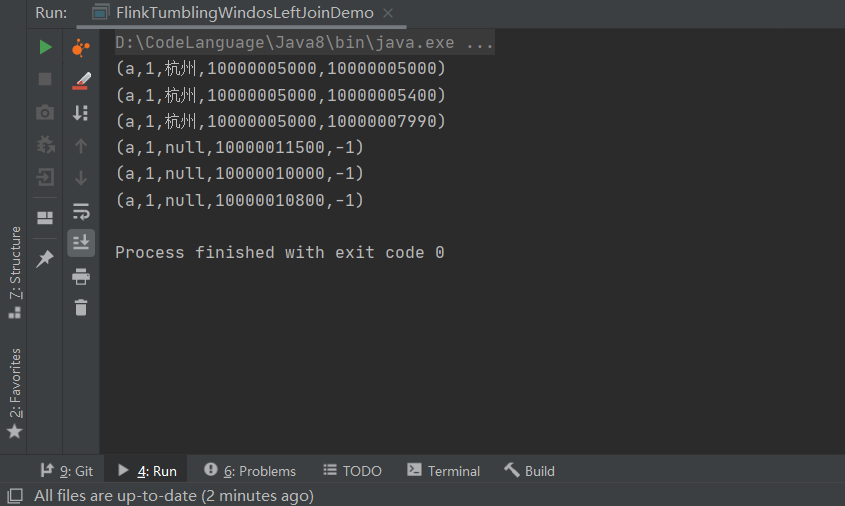
这里使用的是A里面的数据作为关联当关联不上的时候,该位置值被置为空。
InnerJoin
package com.hph.window.join;

import org.apache.flink.api.common.eventtime.*;
import org.apache.flink.api.common.functions.JoinFunction;
import org.apache.flink.api.java.functions.KeySelector;
import org.apache.flink.api.java.tuple.Tuple3;
import org.apache.flink.api.java.tuple.Tuple5;
import org.apache.flink.streaming.api.TimeCharacteristic;
import org.apache.flink.streaming.api.datastream.DataStreamSource;
import org.apache.flink.streaming.api.datastream.SingleOutputStreamOperator;
import org.apache.flink.streaming.api.environment.StreamExecutionEnvironment;
import org.apache.flink.streaming.api.windowing.assigners.TumblingEventTimeWindows;
import org.apache.flink.streaming.api.windowing.time.Time;

public class FlinkTumblingWindosInnerJoinDemo {
    public static void main(String[] args) throws Exception {
        StreamExecutionEnvironment env = StreamExecutionEnvironment.getExecutionEnvironment();
        //设置EventTime作为时间标准
        env.setStreamTimeCharacteristic(TimeCharacteristic.EventTime);
        //通过Env设置并行度为1,即以后所有的DataStream的并行度都是1
        env.setParallelism(1);

        //设置数据源
        //第一个流
        DataStreamSource<Tuple3<String, String, Long>> leftSource = env.addSource(new StreamDataSourceA());
        DataStreamSource<Tuple3<String, String, Long>> rightSource = env.addSource(new StreamDataSourceB());

        //提取时间
        SingleOutputStreamOperator<Tuple3<String, String, Long>> leftStream =
                leftSource.assignTimestampsAndWatermarks(
                        new WatermarkStrategy<Tuple3<String, String, Long>>() {
                            @Override
                            public WatermarkGenerator<Tuple3<String, String, Long>> createWatermarkGenerator(WatermarkGeneratorSupplier.Context context) {
                                return new WatermarkGenerator<Tuple3<String, String, Long>>() {
                                    @Override
                                    public void onEvent(Tuple3<String, String, Long> event, long eventTimestamp, WatermarkOutput output) {
                                        output.emitWatermark(new Watermark(event.f2 - 1000));

                                    }

                                    @Override
                                    public void onPeriodicEmit(WatermarkOutput output) {

                                    }
                                };

                            }

                            @Override
                            public TimestampAssigner<Tuple3<String, String, Long>> createTimestampAssigner(TimestampAssignerSupplier.Context context) {
                                return new TimestampAssigner<Tuple3<String, String, Long>>() {
                                    @Override
                                    public long extractTimestamp(Tuple3<String, String, Long> element, long recordTimestamp) {
                                        return element.f2;
                                    }
                                };
                            }
                        }
                );


        SingleOutputStreamOperator<Tuple3<String, String, Long>> rightStream = rightSource.assignTimestampsAndWatermarks(
                new WatermarkStrategy<Tuple3<String, String, Long>>() {
                    @Override
                    public WatermarkGenerator<Tuple3<String, String, Long>> createWatermarkGenerator(WatermarkGeneratorSupplier.Context context) {
                        return new WatermarkGenerator<Tuple3<String, String, Long>>() {
                            @Override
                            public void onEvent(Tuple3<String, String, Long> event, long eventTimestamp, WatermarkOutput output) {
                                output.emitWatermark(new Watermark(event.f2 - 1000));

                            }

                            @Override
                            public void onPeriodicEmit(WatermarkOutput output) {

                            }
                        };

                    }

                    @Override
                    public TimestampAssigner<Tuple3<String, String, Long>> createTimestampAssigner(TimestampAssignerSupplier.Context context) {
                        return new TimestampAssigner<Tuple3<String, String, Long>>() {
                            @Override
                            public long extractTimestamp(Tuple3<String, String, Long> element, long recordTimestamp) {
                                return element.f2;
                            }
                        };
                    }


                }

        );


        //  join操作
        leftStream.join(rightStream)
                .where(new InnerSelectKey())
                .equalTo(new InnerSelectKey())
                .window(TumblingEventTimeWindows.of(Time.seconds(10L)))
                .apply(new JoinFunction<Tuple3<String, String, Long>, Tuple3<String, String, Long>, Object>() {
                    @Override
                    public Object join(Tuple3<String, String, Long> left, Tuple3<String, String, Long> right) throws Exception {
                        return new Tuple5<>(left.f0, left.f1, right.f1, left.f2, right.f2);
                    }
                }).print();

        env.execute("Stream Join");


    }

    public static class InnerSelectKey implements KeySelector<Tuple3<String, String, Long>, String> {
        @Override
        public String getKey(Tuple3<String, String, Long> value) throws Exception {
            return value.f0;
        }

    }
}
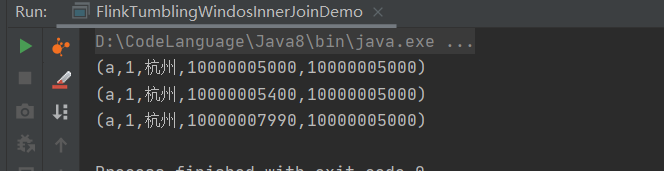
这里取得是交集,当Key相同且在同一窗口是即可关联上。
以上就是关于Flink的窗口的一些杂项知识,兄弟们学废了么?